

Buying a back-to-school laptop on a limited budget usually means choosing between inexpensive hardware and older premium models. This year, students have a more unusual choice: a new Apple MacBook Neo and a Dell XPS 13 available at almost exactly the same price.
At the time of this comparison, the configurations cost:
- Apple MacBook Neo with 8GB memory and 256GB SSD: $689.99 at Amazon.com*
- Dell XPS 13 with 8GB memory and 512GB SSD: $699.99 at BestBuy.com*
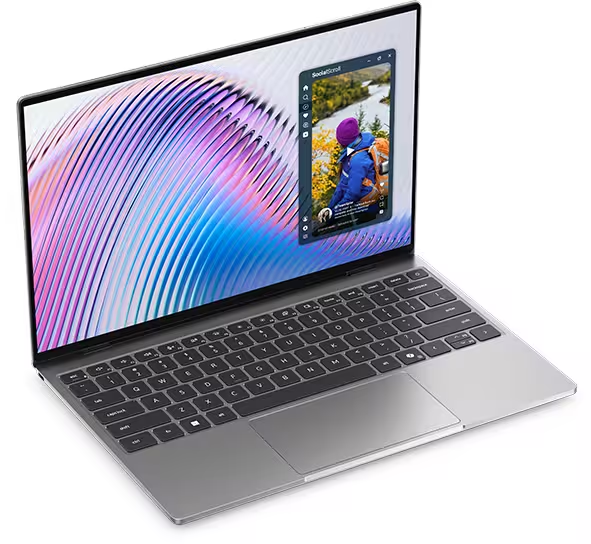
The MacBook Neo offers Apple’s A18 Pro processor, macOS, long battery life and integration with iPhones and iPads. The Dell XPS 13 gives students Windows 11, twice as much storage, a touchscreen and a lighter design.
Neither configuration is perfect. Both have only 8GB of memory, and students should understand that limitation before purchasing. However, for general schoolwork, research, online classes and everyday productivity, both are unusually premium options for less than $700.

MacBook Neo vs Dell XPS 13: Specifications
| Feature | Apple MacBook Neo | Dell XPS 13 |
|---|---|---|
| Current comparison price* | $696 | $699.99 |
| Processor | Apple A18 Pro | Intel Core 5 Series 3 320 |
| Memory | 8GB unified memory | 8GB RAM |
| Storage | 256GB SSD | 512GB SSD |
| Display | 13-inch Liquid Retina | 13.4-inch 2.5K touchscreen |
| Resolution | 2408 × 1506 | 2560 × 1600 |
| Refresh rate | 60Hz | 120Hz |
| Touchscreen | No | Yes |
| Operating system | macOS | Windows 11 |
| Weight | 2.7 pounds | Starting at 2.2 pounds |
| Headphone jack | Yes | No |
| Best for | Apple users and everyday schoolwork | Windows users and students needing more storage |
Prices can change quickly, particularly during back-to-school promotions, so check both listings for current prices.
Which Laptop Offers Better Value Under $700?
The Dell XPS 13 offers more hardware for the money.
Both laptops have 8GB of memory, but the Dell provides a 512GB SSD instead of the MacBook Neo’s 256GB drive. That extra storage is valuable for students who need to save large presentations, course materials, photos, videos or locally installed applications.
Apple Neo’s 256GB SSD can be sufficient when most files are stored in iCloud, Google Drive or OneDrive. However, after accounting for the operating system and installed applications, the usable space will be considerably lower than 256GB.
The Dell’s 512GB SSD gives students more freedom to keep files locally without immediately depending on cloud storage or an external drive.
The Dell also includes a higher-resolution touchscreen with a 120Hz refresh rate. Best Buy lists the display at 2560 by 1600, with 500-nit brightness and touch support. The laptop’s aluminum construction and starting weight of approximately 2.2 pounds add to its premium appeal.
The MacBook Neo’s value is less about specifications and more about the overall Apple experience. For less than $700, you will receive a current-generation Mac with an aluminum design, a sharp display and Apple’s efficient A18 Pro processor.
MacBook Neo vs Dell XPS 13 for Schoolwork
Both laptops should perform well for common school activities, including:
- Writing papers in Microsoft Word or Google Docs
- Researching with multiple browser tabs
- Creating presentations
- Joining Zoom or Teams meetings
- Streaming lectures and educational videos
- Basic coding and web development
- Light photo editing
- Managing email and class schedules
The MacBook Neo uses Apple’s A18 Pro chip with a six-core CPU, five-core integrated GPU and 16-core Neural Engine. Apple positions it as a processor for everyday productivity, spreadsheets, photo editing and on-device AI features.
The Dell uses an Intel Core 5 Series 3 320 processor with integrated Intel graphics. It is also designed primarily for productivity, multitasking and daily applications rather than demanding gaming or professional 3D work.
Processor performance is only part of the story. Both laptops have 8GB of memory, which is enough for normal schoolwork but not ideal for heavy multitasking.
Students may notice slowdowns when running many browser tabs alongside Teams, Photoshop, large spreadsheets and other applications. Neither laptop allows the memory to be upgraded later, so the original configuration matters.
For a closer look at memory requirements, see our guide to how much RAM a laptop should have.
Dell Wins on Storage
The clearest difference between these two sub-$700 configurations is storage.
The MacBook Neo includes a 256GB SSD, while the Dell provides 512GB. Amazon’s MacBook listing has 8GB of unified memory and 256GB of storage. Best Buy lists the Dell with 8GB of memory and 512GB of storage for $699.99*.
The Dell is therefore the safer choice for students who:
- Install several large applications
- Keep videos or photos on the laptop
- Download lecture recordings
- Work with large design or engineering files
- Do not want to pay for cloud storage
- Expect to use the laptop for several years
The MacBook’s 256GB drive is more manageable for students who mainly use browser-based tools and store documents online. An external SSD can also add storage later, although carrying another device is less convenient.
Amazon offers a 512GB MacBook Neo, but its price is around $789*.
Display Quality and Touchscreen
Both laptops have excellent displays for their price, but the Dell offers more features.
The MacBook Neo has a 13-inch Liquid Retina display with:
- 2408 x 1506 resolution
- brightness of up to 500 nits
- 60Hz refresh rate
- support for one billion colors
Text should look sharp, while the compact size works well in classrooms and small study spaces.
The Dell XPS 13 has a slightly larger 13.4-inch display with:
- 2560 × 1600 resolution
- 500-nit brightness
- 120Hz refresh rate
- Touchscreen support
The 120Hz refresh rate makes scrolling and animations appear smoother, while touch support can be useful for navigating documents, enlarging diagrams and interacting with educational applications.
Both models use LED-backlit LCD technology rather than OLED. Our OLED vs LCD laptop display comparison explains how the technologies differ.
Portability for School and College
Both laptops are easy to carry, but the Dell is lighter.
The MacBook Neo weighs approximately 2.7 pounds. Apple gives it a compact aluminum body measuring only half an inch thick.
Dell says the XPS 13 starts at approximately 2.2 pounds, although its exact weight can vary by configuration. That makes it around half a pound lighter than the MacBook Neo.
Half a pound may not seem significant, but students carrying a laptop, charger, books and water bottle throughout the day may notice the difference.
Both are excellent choices for commuting, moving between classrooms and working in a library or coffee shop.

Battery Life and Charging
Apple advertises up to 16 hours of video streaming and up to 11 hours of wireless web use for the MacBook Neo. It includes a relatively small 36.5Wh battery and a 20W USB-C power adapter.
Dell describes the XPS 13 as offering long, all-day battery life, although real-world endurance will depend on screen brightness, refresh rate, applications and power settings.
The MacBook Neo may have an efficiency advantage because Apple controls both the processor and operating system. The Dell’s higher-resolution 120Hz touchscreen may consume more power, although Windows power settings can reduce the refresh rate when maximum battery life is needed.
Either laptop should be suitable for a normal school day, but students should not expect manufacturer battery claims to match every workload.
macOS or Windows 11?
Software compatibility may be more important than any specification in this comparison.
Choose the Dell XPS 13 when your program requires Windows applications. Windows remains common in business, engineering, information technology and specialized academic software.
Choose the MacBook Neo when your required programs support macOS and you already use other Apple products. Features such as AirDrop, iCloud, Messages, iPhone Mirroring and shared copy-and-paste can make it easier to move information between devices.
Before purchasing, students should check their school or department’s software requirements. Some programs may require Windows even when a Mac appears powerful enough.
What About the More Expensive Configurations?
Both manufacturers offer upgraded versions, but their prices change the value calculation.
The MacBook Neo with 512GB of storage costs around $789* at Amazon, while the Dell XPS 13 with 16GB of memory costs around $899* at BestBuy.
The 16GB Dell is better suited to demanding multitasking and longer-term use, but the $200 price increase puts it in a different category. At that price, students should also compare other laptops with 16GB of memory.
The 512GB MacBook solves the base model’s storage limitation, but it still has 8GB of memory. Spending almost $100 more primarily for additional storage may not be worthwhile when external and cloud storage are available.
Want to compare every configuration side by side? View our full MacBook Neo vs Dell XPS 13 comparison, including the 256GB and 512GB MacBook Neo models and the 8GB and 16GB Dell XPS 13 configurations.
Which One Should You Buy?
Choose the MacBook Neo if:
- You specifically want macOS
- You already use an iPhone or iPad
- Most of your work is browser-based
- You store files in the cloud
- You value battery efficiency and Apple integration
- You need a built-in headphone jack
Choose the Dell XPS 13 if:
- You need Windows for school
- You want 512GB of storage
- You want a touchscreen
- You prefer a smoother 120Hz display
- You want the lighter laptop
- You want the most hardware for less than $700
Final Verdict
For students looking for the best laptop from those two, for under $700, the Dell XPS 13 offers stronger hardware value, while the MacBook Neo is the better budget MacBook for students who prefer macOS.
It matches the MacBook Neo’s 8GB of memory but provides twice the storage, a touchscreen, a smoother 120Hz display and a lighter design. Windows also offers broader compatibility with school software, accessories and games.
The MacBook Neo is still the better choice for students who specifically want a Mac. Its A18 Pro processor, sharp display, long battery life and Apple ecosystem make it an attractive everyday laptop. The main compromise is its 256GB SSD, which may require greater reliance on cloud or external storage.
Neither laptop is ideal for heavy engineering software, advanced video editing, 3D design or serious gaming. But for writing, research, online classes, presentations and general student work, both deliver a surprisingly premium experience for less than $700.
Best overall value under $700: Dell XPS 13
Best under $700 Mac: Apple MacBook Neo
Best for storage: Dell XPS 13
Best for Apple users: MacBook Neo
*Prices were accurate at the time of writing on August 1, 2026, and may change at any time.