Choosing a student laptop in 2026 can be confusing. There are budget laptops, gaming laptops, Chromebooks, MacBooks, AI laptops, 2-in-1 laptops, and dozens of processor names that sound almost the same.
The good news is that most students do not need the most expensive laptop. What matters is choosing the right balance of performance, battery life, portability, storage, and display quality.
This guide explains the best laptop specs for students in 2026 in simple terms, so you can avoid overpaying for features you do not need — or buying a laptop that feels slow after one semester.
You can also browse current models in the LaptopStats laptop catalog, use the LaptopStats laptop picker, or compare models side by side with the LaptopStats laptop comparison tool.
Quick Answer: Best Laptop Specs for Students in 2026
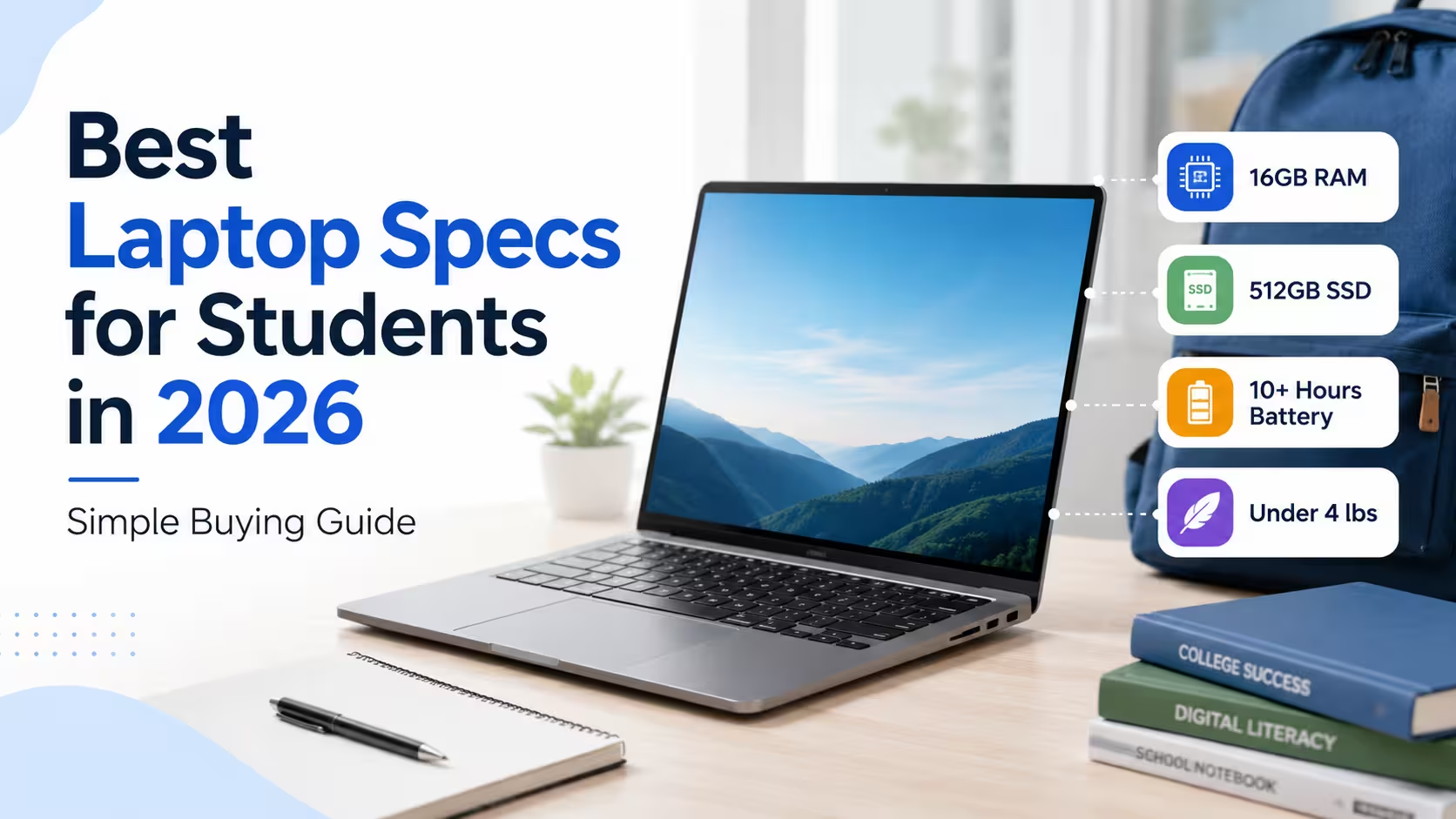
For most students, a good laptop in 2026 should have:
- Processor: Intel Core Ultra 5 / Core i5, AMD Ryzen 5 / Ryzen AI 5, Apple M-series, or Snapdragon X-series
- RAM: 16GB recommended
- Storage: 512GB SSD recommended
- Display: 13-inch to 15.6-inch Full HD or better
- Battery life: 8 to 12+ hours
- Weight: Under 4 lbs if carrying it daily
- Webcam: 1080p preferred
- Wi-Fi: Wi-Fi 6 or newer
- Ports: USB-C, USB-A if possible, HDMI if needed
A laptop with 16GB RAM and a 512GB SSD is the safest choice for most college and university students in 2026. Some basic school users can still manage with 8GB RAM and 256GB storage
Processor: What CPU Should a Student Laptop Have?
The processor, or CPU, controls how fast your laptop handles everyday tasks like browsing, writing papers, joining video calls, opening spreadsheets, and running school software.
For most students, you do not need the most powerful processor. A modern mid-range chip is usually enough.
Good student laptop processors in 2026 include:
- Intel Core i5
- Intel Core Ultra 5
- Intel Core Ultra 7
- AMD Ryzen 5
- AMD Ryzen 7
- AMD Ryzen AI 5
- AMD Ryzen AI 7
- Apple M2, M3, M4, or newer
- Snapdragon X Plus or Snapdragon X Elite
For general schoolwork, an Intel Core i5/Core Ultra 5 or AMD Ryzen 5/Ryzen AI 5 is usually enough. For engineering, programming, design, architecture, or video editing, consider a stronger processor like an Intel Core Ultra 7, AMD Ryzen 7, Ryzen AI 7, or Apple M-series chip.
If you are looking at AI laptops, check whether the laptop includes an NPU. You can learn more in our guide: What Is an NPU in a Laptop?
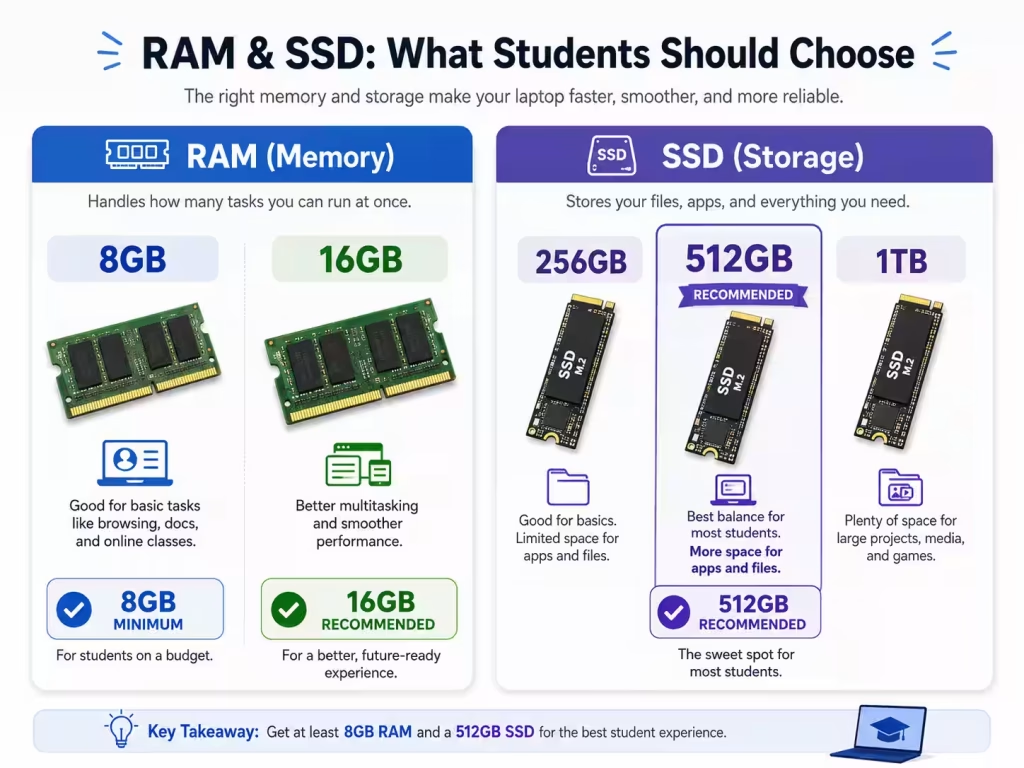
RAM: Is 8GB Enough for Students in 2026?
RAM affects how many apps, browser tabs, documents, and background tasks your laptop can handle at the same time.
In 2026, 16GB RAM is the best choice for most students.
RAM recommendations for students:
| Student Type | Recommended RAM |
|---|---|
| Basic schoolwork, email, Google Docs | 8GB minimum |
| College, university, multitasking | 16GB recommended |
| Programming, design, engineering | 16GB to 32GB |
| Video editing, 3D work, heavy creative apps | 32GB or more |
An 8GB laptop can still work for light use, especially if it is a Chromebook or a basic Windows laptop. However, if you plan to keep the laptop for several years, 16GB is a much better long-term choice.
Students often keep many browser tabs open while running Word, Excel, Zoom, Teams, Spotify, PDFs, and research tools. That is where 16GB RAM makes a real difference.
Storage: 256GB vs 512GB vs 1TB SSD
Storage is where your files, apps, downloads, photos, videos, and school projects are saved.
For students in 2026, 512GB SSD is the best balance.
Storage recommendations:
| Storage Size | Best For |
| 128GB | Too limited for most students |
| 256GB | Basic schoolwork and cloud storage users |
| 512GB | Best choice for most students |
| 1TB | Best for creative work, large files, games, and long-term use |
A 256GB SSD can work if you mostly use Google Drive, OneDrive, iCloud, or school cloud storage. But after installing apps, updates, downloads, and offline files, 256GB can fill up quickly.
A 512GB SSD gives students more breathing room without making the laptop too expensive. If you work with video files, design software, games, or large engineering programs, consider 1TB.
Display: What Screen Size Is Best for Students?
The best laptop screen size depends on how you use the laptop.
Best display sizes for students:
| Display Size | Best For |
| 13-inch | Maximum portability |
| 14-inch | Best balance for most students |
| 15.6-inch | Larger screen for multitasking |
| 16-inch+ | Creative work, design, engineering, gaming |
For most students, a 14-inch laptop is the sweet spot. It is large enough for writing, research, and video calls, but still easy to carry around campus.
A 15.6-inch laptop gives you more screen space, but it is usually heavier. A 13-inch laptop is easier to carry, but the smaller screen may feel cramped when working with documents and browser tabs side by side.
At minimum, look for a screen resolution 1920 x 1080. Higher-resolution screens can look sharper, but they may cost more and sometimes use more battery.
If you are choosing between OLED and LCD, read our full guide here: OLED vs LCD Laptop Displays: Which Screen Is Better for You?
Battery Life: How Much Is Enough?
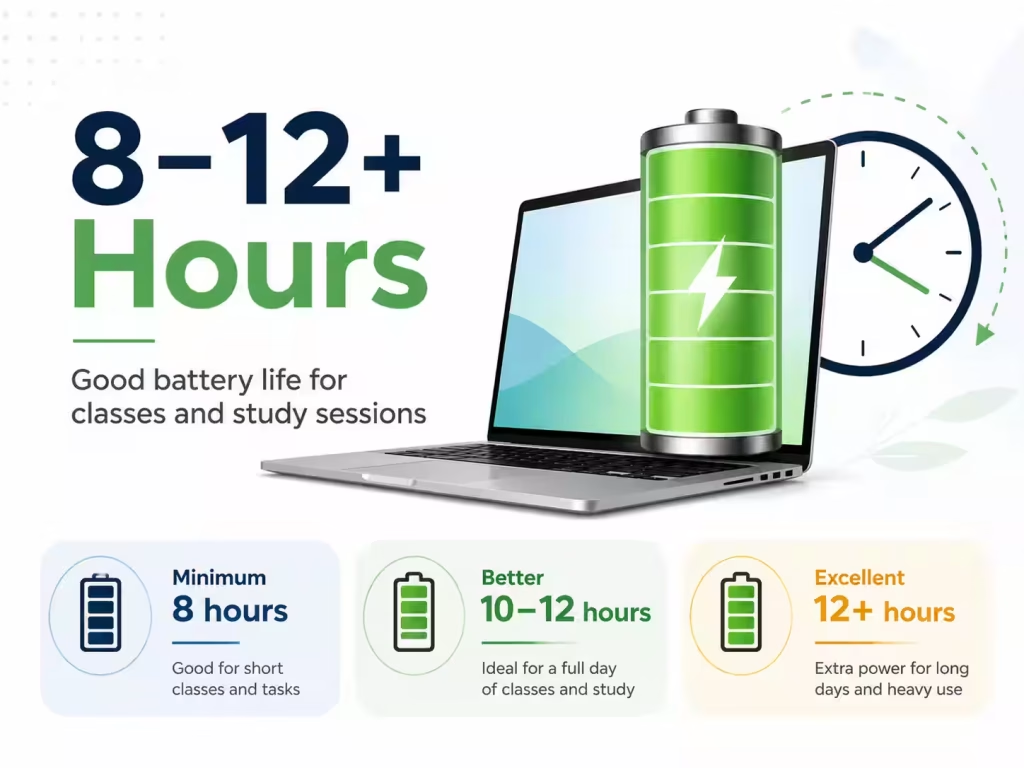
Battery life is one of the most important specs for students.
A good student laptop should last through classes, study sessions, and library work without needing to stay plugged in all day.
Battery life recommendation:
- Minimum: 8 hours
- Better: 10 to 12 hours
- Excellent: 12+ hours
Battery life depends on screen brightness, apps, video calls, Wi-Fi, and background tasks. Manufacturer claims are often based on light usage, so real-world battery life may be lower.
If you are on campus all day, battery life should be a higher priority than gaming performance or flashy features.
Weight: Choose a Laptop You Can Carry Every Day
A powerful laptop is not useful if you hate carrying it.
For students, weight matters because the laptop will often sit in a backpack with books, chargers, notebooks, and other items.
Weight recommendations:
| Laptop Weight | Student Experience |
| Under 3 lbs | Very portable |
| 3 to 4 lbs | Good for most students |
| 4 to 5 lbs | Noticeable in a backpack |
| Over 5 lbs | Better for desk use than daily carrying |
For most students, try to stay under 4 lbs. Gaming laptops and workstation laptops can be much heavier, and they often have larger chargers too.
Graphics: Do Students Need a Dedicated GPU?
Most students do not need a dedicated graphics card.
Integrated graphics are enough for:
- Web browsing
- Microsoft Office
- Google Docs
- Video streaming
- Online classes
- Light photo editing
- Basic coding
- Presentations
A dedicated GPU is useful for:
- Gaming
- 3D modeling
- CAD software
- Video editing
- Animation
- Architecture
- Some engineering programs
- AI and machine learning workloads
If you are a business, education, nursing, writing, or general college student, integrated graphics are usually fine. If you are studying engineering, architecture, game design, media production, or 3D design, consider a laptop with NVIDIA GeForce RTX or a strong integrated GPU.
NPU and AI Features: Are They Important for Students?
Many 2026 laptops advertise AI features. These laptops may include an NPU, which stands for Neural Processing Unit.
An NPU can help with certain AI tasks, especially features like background blur, noise reduction, live captions, image tools, and future AI apps.
However, an NPU should not be the only reason you buy a laptop. For students, the basics still matter more:
- Good battery life
- Enough RAM
- Enough storage
- Comfortable keyboard
- Clear display
- Reliable performance
If two laptops are similar in price, choosing the one with a stronger AI processor or NPU may help it feel more future-ready. But do not sacrifice RAM, storage, or build quality just to get an AI label.
You can browse AI-ready models in the LaptopStats laptop catalog.
Webcam, Microphone, and Keyboard
Students use laptops for more than writing papers. Online classes, group projects, video calls, and remote meetings are now common.
Look for:
- 1080p webcam if possible
- Good microphone quality
- Comfortable keyboard
- Backlit keyboard
- Large trackpad
- Physical webcam shutter if privacy matters
A backlit keyboard is especially useful for dorm rooms, libraries, evening study sessions, and travel.
Ports and Connectivity
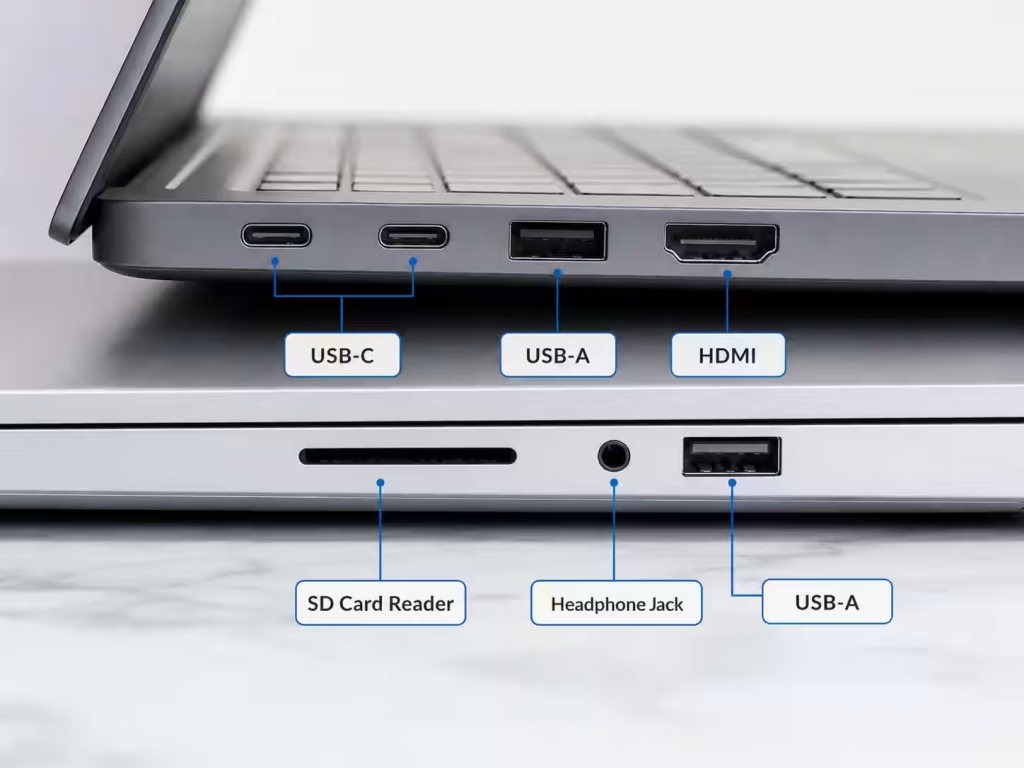
Ports are easy to ignore until you need them.
A good student laptop should have at least one USB-C port. It is even better if it supports charging through USB-C.
Useful ports include:
- USB-C
- USB-A
- HDMI
- Headphone jack
- SD card reader
- Thunderbolt or USB4 on premium laptops
If the laptop has only USB-C ports, you may need a dongle or adapter for older accessories.
For wireless connectivity, look for Wi-Fi 6 or newer. This helps with faster and more stable internet connections in dorms, classrooms, libraries, and shared spaces.
Best Laptop Specs by Student Type
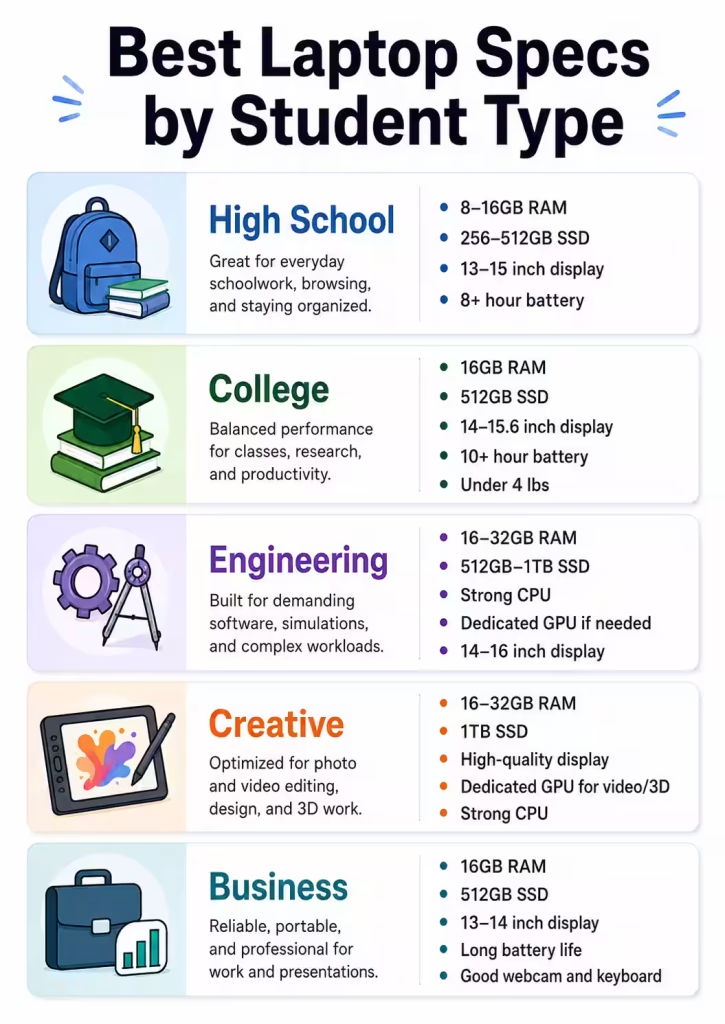
Best Specs for High School Students
High school students usually need a laptop for web browsing, writing, online assignments, video calls, and streaming.
Recommended specs:
- Intel Core i3/i5, AMD Ryzen 3/5, Apple M-series, or Chromebook processor
- 8GB to 16GB RAM
- 256GB to 512GB SSD
- 13-inch to 15-inch display
- 8+ hours battery life
- Lightweight design
Best Specs for College Students
College students should aim for a laptop that can last several years.
Recommended specs:
- Intel Core Ultra 5, Intel Core i5, AMD Ryzen 5, Ryzen AI 5, Apple M-series, or Snapdragon X-series
- 16GB RAM
- 512GB SSD
- 14-inch or 15.6-inch display
- 10+ hours battery life
- Under 4 lbs if possible
Best Specs for Engineering Students
Engineering students may need more performance, especially for CAD, simulations, coding, or technical software.
Recommended specs:
- Intel Core Ultra 7, AMD Ryzen 7, Ryzen AI 7, or better
- 16GB to 32GB RAM
- 512GB to 1TB SSD
- Dedicated GPU if required by your program
- 14-inch to 16-inch display
Best Specs for Creative Students
Creative students working with video, photography, design, or animation need stronger hardware.
Recommended specs:
- Intel Core Ultra 7, AMD Ryzen 7, Apple M-series Pro-level chip, or better
- 16GB to 32GB RAM
- 1TB SSD if working with large files
- OLED or high-quality IPS display
- Dedicated GPU for video editing, 3D, or animation
Best Specs for Business Students
Business students usually need portability, battery life, and multitasking performance.
Recommended specs:
- Intel Core Ultra 5, AMD Ryzen 5, Apple M-series, or Snapdragon X-series
- 16GB RAM
- 512GB SSD
- 13-inch or 14-inch display
- Long battery life
- Good webcam and keyboard
Chromebook, Windows Laptop, or MacBook?
Choose a Chromebook if:
- You mostly use Google Docs, Gmail, Chrome, and web apps
- You want something affordable
- Your school supports ChromeOS
- You do not need Windows-only software
Choose a Windows laptop if:
- You want the widest software compatibility
- You need Microsoft Office, engineering tools, or business apps
- You want more choices at different prices
- You may need gaming or dedicated graphics
Choose a MacBook if:
- You prefer macOS
- You want strong battery life and build quality
- You use Apple devices already
- Your school software works on macOS
Before buying, check your school or college program requirements. Some majors require Windows-only applications, while others work perfectly with macOS or ChromeOS.
What Specs Should Students Avoid?
Try to avoid laptops with:
- 4GB RAM
- 64GB or 128GB storage
- Older hard drives instead of SSDs
- Low-resolution displays below Full HD
- Very heavy designs for daily campus use
- Weak battery life
- Unknown or outdated processors
- No USB-C port
A very cheap laptop can look like a good deal, but if it becomes slow quickly, it may cost more in the long run.
Final Buying Tips
Before buying a student laptop, think about how it will actually be used.
A student who only writes papers and uses Google Docs does not need the same laptop as someone studying engineering, design, or video production. The best laptop is not always the most expensive one — it is the one that matches the student’s workload.
Start by looking for 16GB RAM, 512GB SSD, good battery life, and a comfortable size. Then compare processors, displays, weight, and price.
You can browse student-friendly laptops in the LaptopStats laptop catalog, find matching models with the LaptopStats laptop picker, compare your final choices using the LaptopStats compare tool, or check current offers on the LaptopStats laptop deals page.
A good student laptop should feel fast, last through the day, fit in a backpack, and have enough power to handle schoolwork for years – not just the first semester.