Quick answer: Choose OLED for deeper blacks, stronger contrast, and faster response times. Choose LCD for lower prices, more matte-screen options, and often better battery life during everyday work. The best choice depends on whether you prioritize image quality or practicality.
Choosing between an OLED and LCD laptop screen affects picture quality, battery life, price, glare, and long-term use. OLED usually delivers the more impressive image, while LCD remains the practical choice for many students, office users, and budget-conscious buyers.

OLED vs LCD Laptop Screens: Quick Comparison
| Feature | OLED | LCD |
|---|---|---|
| Black levels | True black | Usually dark gray |
| Contrast | Excellent | Good to very good |
| Colors | Often richer | Depends on panel quality |
| Battery life | Changes with screen content | Often better for productivity |
| Response time | Very fast | Usually slower |
| Burn-in risk | Small but possible | No OLED-style burn-in |
| Screen finish | Often glossy | Matte options are common |
| Price | Usually higher | Generally lower |
| Best for | Movies, gaming, creative work | Office work, school, general use |
What Is an OLED Laptop Display?
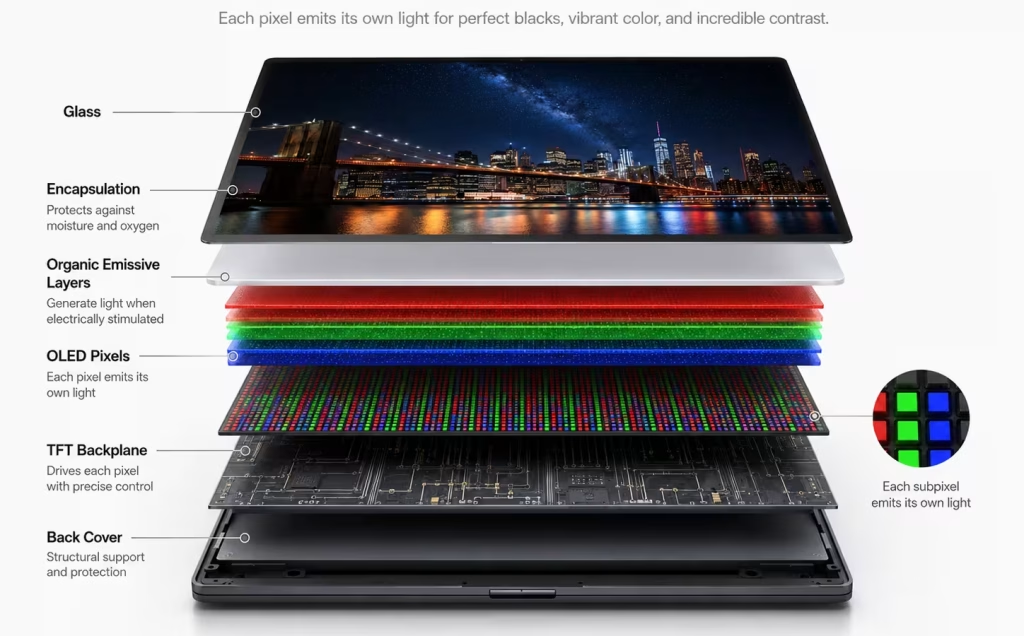
OLED stands for Organic Light-Emitting Diode. Each pixel produces its own light, so an OLED panel does not need a separate backlight. When a pixel displays black, it can switch off completely.
This gives OLED its main advantages: true blacks, high contrast, vivid images, and fast pixel response. OLED laptop screens are especially attractive for movies, games, photography, and video work. Samsung Display testing has also shown lower motion blur and faster moving-picture response than a comparable LCD panel, although performance varies by model.
OLED advantages
- True blacks and excellent contrast
- Rich colors and strong HDR appearance
- Fast response times
- Wide viewing angles
OLED disadvantages
- Usually costs more
- Often glossy and reflective
- May use more power with bright content
- Small risk of permanent image retention
What Is an LCD Laptop Display?
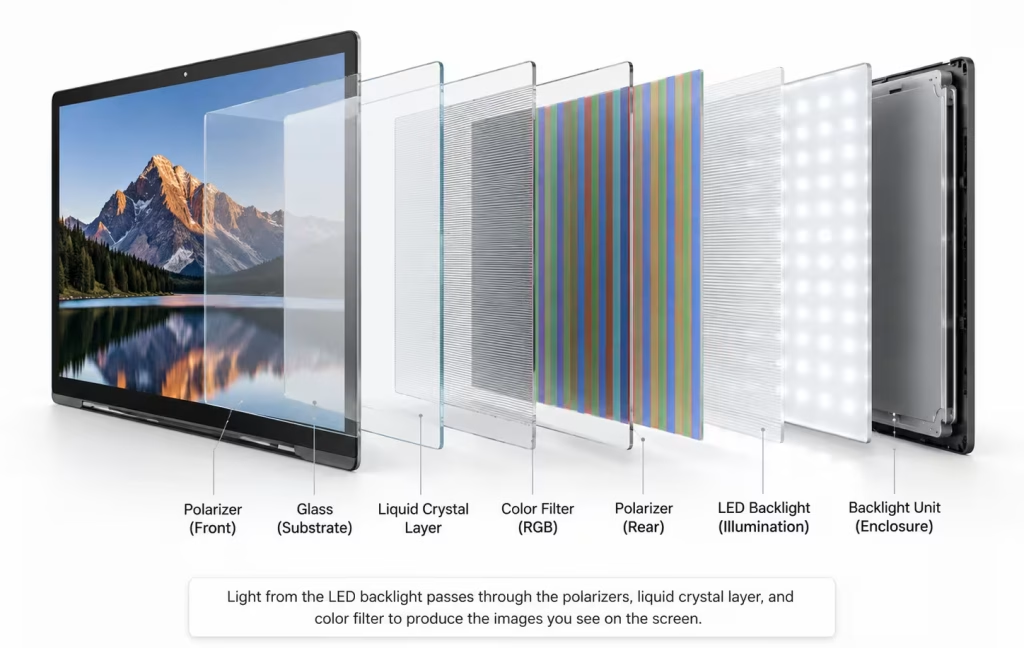
LCD stands for Liquid Crystal Display. Laptop LCD panels use a backlight—normally an LED backlight—to illuminate the screen.
Because that backlight stays active behind the pixels, LCD cannot usually produce the same true black as OLED. However, LCD quality varies greatly. A good IPS LCD can provide accurate colors, wide viewing angles, strong brightness, and sharp text.
IPS is a type of LCD, so the real comparison for many modern laptops is OLED versus IPS LCD.
LCD advantages
- Usually more affordable
- No OLED-style burn-in risk
- Many matte and anti-glare options
- Well suited to office and school use
LCD disadvantages
- Lower contrast than OLED
- Blacks can look gray in dark rooms
- Backlight bleeding may be visible
- Cheap panels can have weak colors
OLED vs LCD: Picture Quality
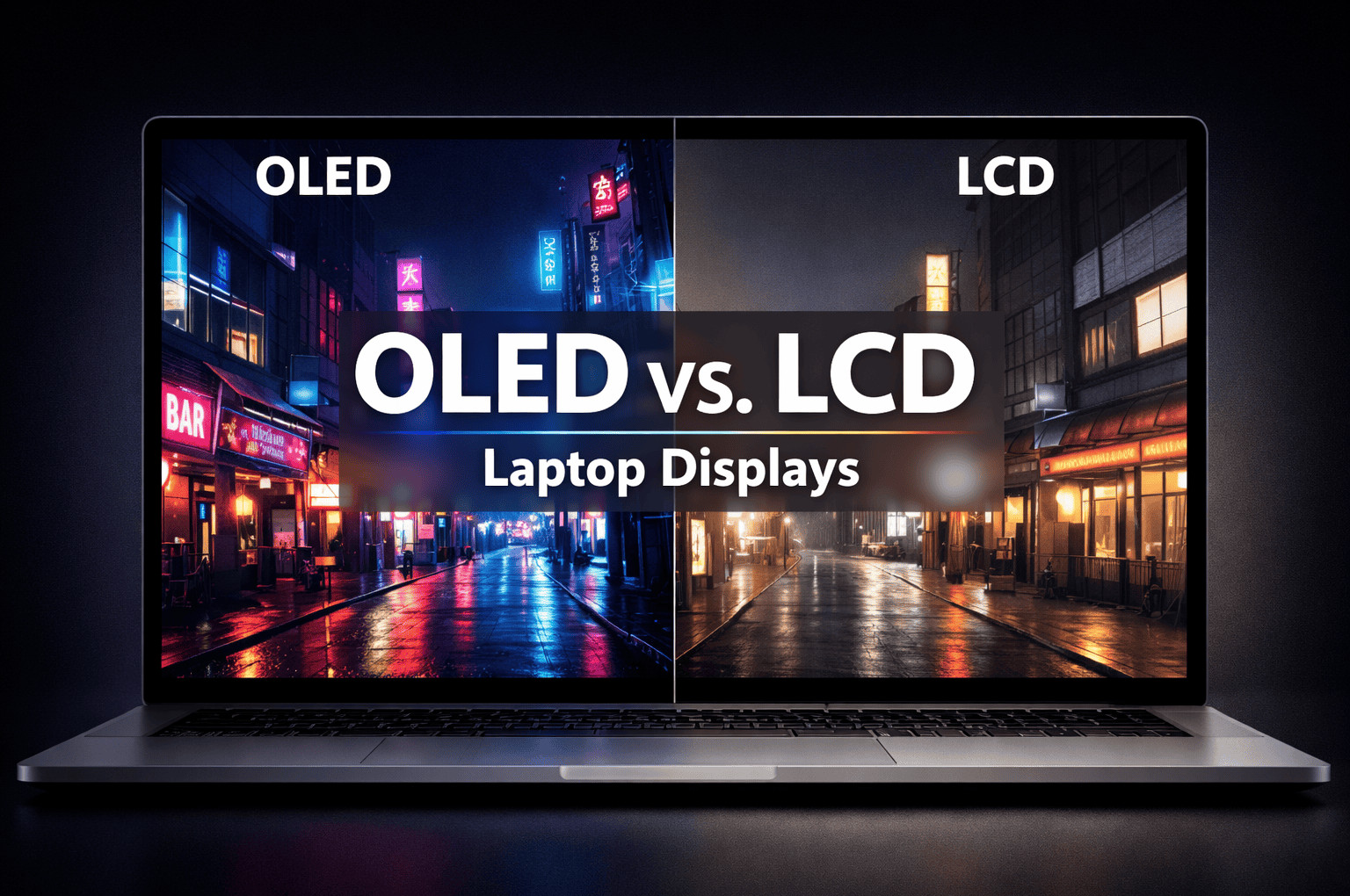
OLED normally wins for overall picture quality.
Because each OLED pixel controls its own light, a bright object can appear beside a completely black area without the gray glow caused by an LCD backlight. Dark scenes therefore look deeper, and perceived contrast is much stronger.
OLED screens also tend to look more vivid, but vivid does not always mean accurate. For photo or video editing, check the laptop’s color-gamut coverage and calibration rather than relying only on the OLED label.
A good IPS LCD can still look excellent for documents, browsing, video calls, and general use.
Winner: OLED
OLED vs LCD: Battery Life
For typical laptop productivity with bright webpages, documents, and spreadsheets, LCD often has the battery-life advantage over OLED. OLED power consumption varies with what is displayed, so dark content can reduce the difference while bright content can increase power use.
Battery life is more complicated than saying one technology always wins.
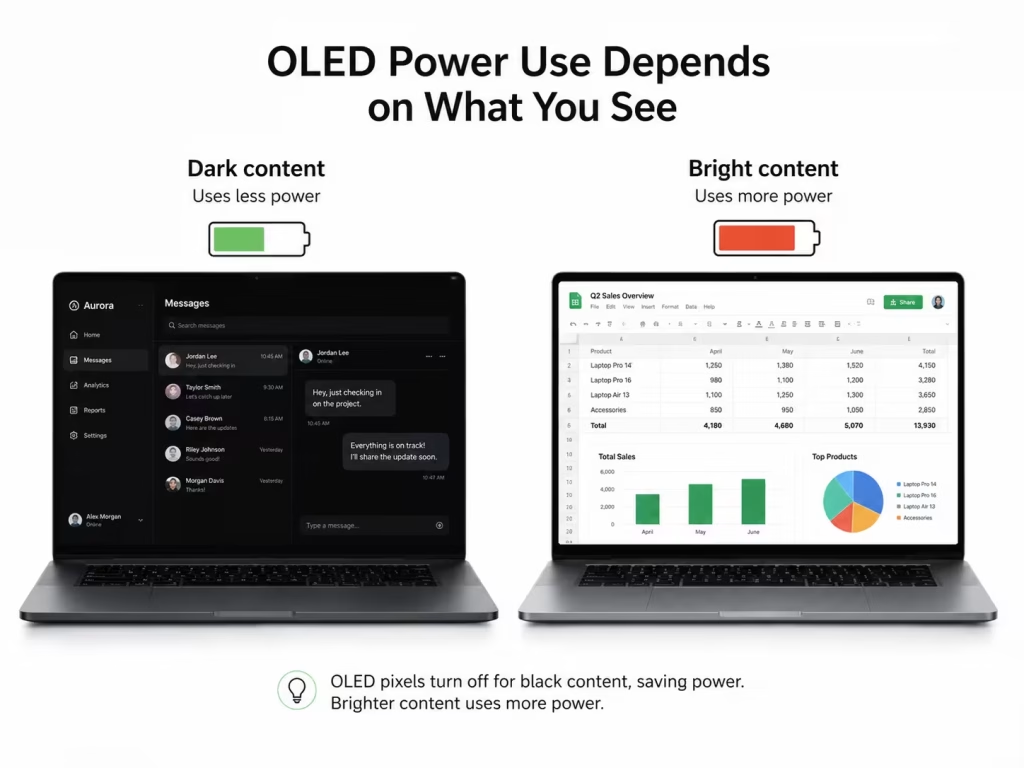
An LCD uses a backlight across the entire screen, so its display power use is relatively consistent at a given brightness. OLED power consumption changes with the image: black pixels can switch off, while bright pixels use more energy.
Dark interfaces can therefore help an OLED panel use less power, while white webpages, documents, and spreadsheets may use more. HDR, high brightness, resolution, and refresh rate can also affect runtime. Intel notes that HDR display use can have a significant effect on laptop battery life.
Actual battery life also depends on the processor, battery capacity, software, wireless activity, power settings, and screen brightness. Laptop manufacturers caution that runtime varies by configuration and usage.
For document-heavy work and browsing with mostly bright backgrounds, an otherwise comparable LCD model may provide longer battery life, but results vary by laptop. OLED battery life can still be excellent in a well-designed laptop, so compare testing of the exact configuration.
Typical advantage: LCD for bright, document-heavy productivity, although results vary by laptop configuration.
OLED vs LCD: Burn-In and Long-Term Use
OLED screens can sometimes show temporary image persistence, where a faint previous image remains briefly. Permanent burn-in is more serious and can occur in extreme cases when the same high-contrast image is displayed at high brightness for prolonged periods.
Possible static elements include the Windows taskbar, browser tabs, editing toolbars, and game interfaces. Modern OLED laptops reduce the risk with features such as pixel shifting, automatic dimming, and screen-refresh routines.
For normal mixed use, burn-in is unlikely to be an immediate concern. It matters more for users who leave the same static application visible for many hours every day.
LCD does not have OLED-style burn-in.
Winner: LCD
OLED vs LCD: Glare and Outdoor Use
Many OLED laptops use glossy screens. They can look vibrant indoors but may reflect windows, lights, and nearby objects.
LCD laptops are more commonly available with matte or anti-glare finishes. A bright matte IPS screen may therefore be easier to use outdoors or in a brightly lit office.
Check the exact panel’s brightness, surface finish, and anti-reflective coating. Display technology alone does not determine outdoor visibility.
Winner: Usually LCD for bright environments
OLED vs LCD for Gaming and Creative Work
OLED is excellent for gaming because of its fast response, low motion blur, deep blacks, and strong contrast. High-refresh OLED laptop panels are also available.
However, an LCD gaming laptop may cost less, leaving more of the budget for a stronger graphics card.
For photo and video editing, OLED’s contrast and wide color capabilities are useful, but color accuracy remains essential. Check sRGB or DCI-P3 coverage, calibration, brightness, and resolution for the specific laptop.
Winner: OLED for image quality; LCD may offer better value
OLED vs LCD for Work and School
LCD is often the more practical option for productivity. Documents, email, spreadsheets, and websites frequently use bright backgrounds, where OLED’s perfect blacks provide less benefit and may consume more energy.
LCD laptops also tend to cost less and offer more matte-screen choices. OLED may still be worthwhile for students or professionals who also watch movies, edit media, or want a more premium display.
Winner: LCD for most everyday productivity
Is OLED Worth Paying More For?
OLED is worth considering when you care strongly about contrast, watch many movies, play visually detailed games, edit media, and mostly use the laptop indoors.
LCD is usually better when you work mainly with documents and websites, need dependable battery life, prefer a matte screen, work in bright environments, or want the best value.
Do not choose a laptop based only on OLED or LCD. Also compare brightness, resolution, refresh rate, color coverage, and screen finish.
You can use the Laptop Picker to narrow your options or browse the full Laptop Catalog.
OLED vs LCD Laptop Screens: Final Verdict
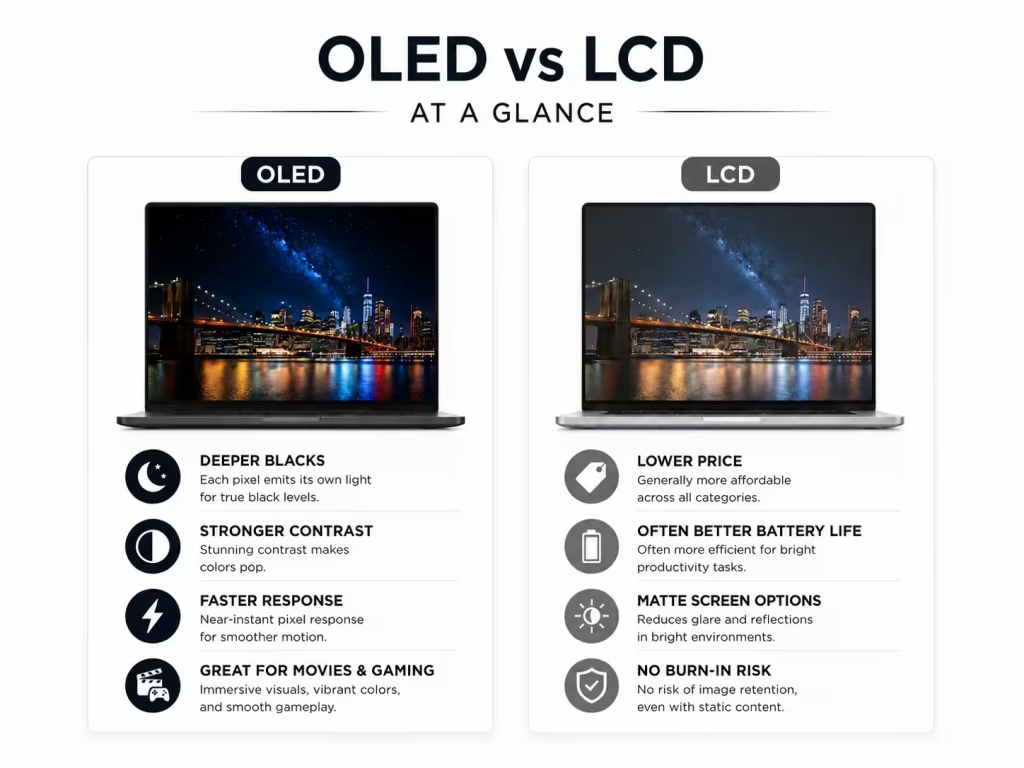
OLED provides the better visual experience. Its true blacks, high contrast, vivid image quality, and fast response make it ideal for movies, gaming, photography, and video work.
LCD remains the more practical choice for many buyers. It usually costs less, often provides better battery life for productivity, offers more matte-screen options, and has no OLED-style burn-in risk.
For students, office users, and budget-conscious buyers, a good IPS LCD is usually enough. For creators, gamers, and movie watchers who value display quality, OLED can be worth the extra cost.
Choose OLED for the best picture quality. Choose LCD for value, battery life, and everyday practicality.
Frequently Asked Questions
Is OLED better than LCD for a laptop?
OLED is better for black levels, contrast, response time, movies, and gaming. LCD is often better for price, matte-screen availability, and general productivity.
Does an OLED laptop use more battery?
It can. OLED power use depends on what is displayed. Dark content may use less energy, while bright webpages and documents may use more. Resolution, brightness, and refresh rate also matter.
Can an OLED laptop get burn-in?
Yes, but modern protection features reduce the risk. Most users who regularly change applications and content are unlikely to encounter burn-in quickly.
Is IPS the same as LCD?
IPS is a type of LCD panel. IPS screens generally provide better colors and viewing angles than cheaper TN LCD panels.