
Quick answer: Choose OLED for deeper blacks, stronger contrast, and faster response times. Choose LCD for lower prices, more matte-screen options, and often better battery life during everyday work. The best choice depends on whether you prioritize image quality or practicality.
Choosing between an OLED and LCD laptop screen affects picture quality, battery life, price, glare, and long-term use. OLED usually delivers the more impressive image, while LCD remains the practical choice for many students, office users, and budget-conscious buyers.

OLED vs LCD Laptop Screens: Quick Comparison
| Feature | OLED | LCD |
|---|---|---|
| Black levels | True black | Usually dark gray |
| Contrast | Excellent | Good to very good |
| Colors | Often richer | Depends on panel quality |
| Battery life | Changes with screen content | Often better for productivity |
| Response time | Very fast | Usually slower |
| Burn-in risk | Small but possible | No OLED-style burn-in |
| Screen finish | Often glossy | Matte options are common |
| Price | Usually higher | Generally lower |
| Best for | Movies, gaming, creative work | Office work, school, general use |
What Is an OLED Laptop Display?
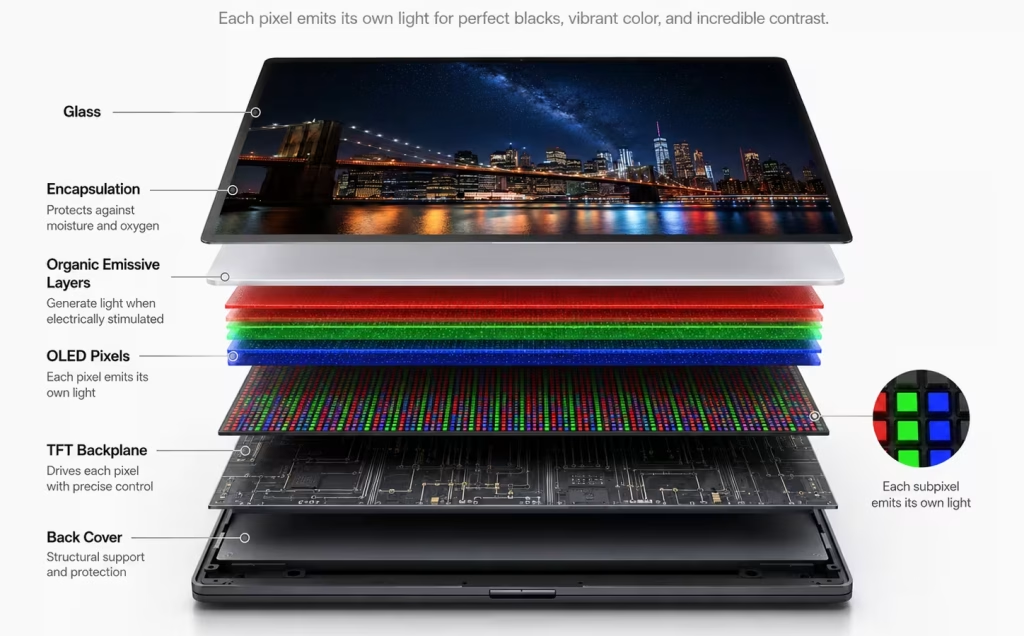
OLED stands for Organic Light-Emitting Diode. Each pixel produces its own light, so an OLED panel does not need a separate backlight. When a pixel displays black, it can switch off completely.
This gives OLED its main advantages: true blacks, high contrast, vivid images, and fast pixel response. OLED laptop screens are especially attractive for movies, games, photography, and video work. Samsung Display testing has also shown lower motion blur and faster moving-picture response than a comparable LCD panel, although performance varies by model.
OLED advantages
- True blacks and excellent contrast
- Rich colors and strong HDR appearance
- Fast response times
- Wide viewing angles
OLED disadvantages
- Usually costs more
- Often glossy and reflective
- May use more power with bright content
- Small risk of permanent image retention
What Is an LCD Laptop Display?
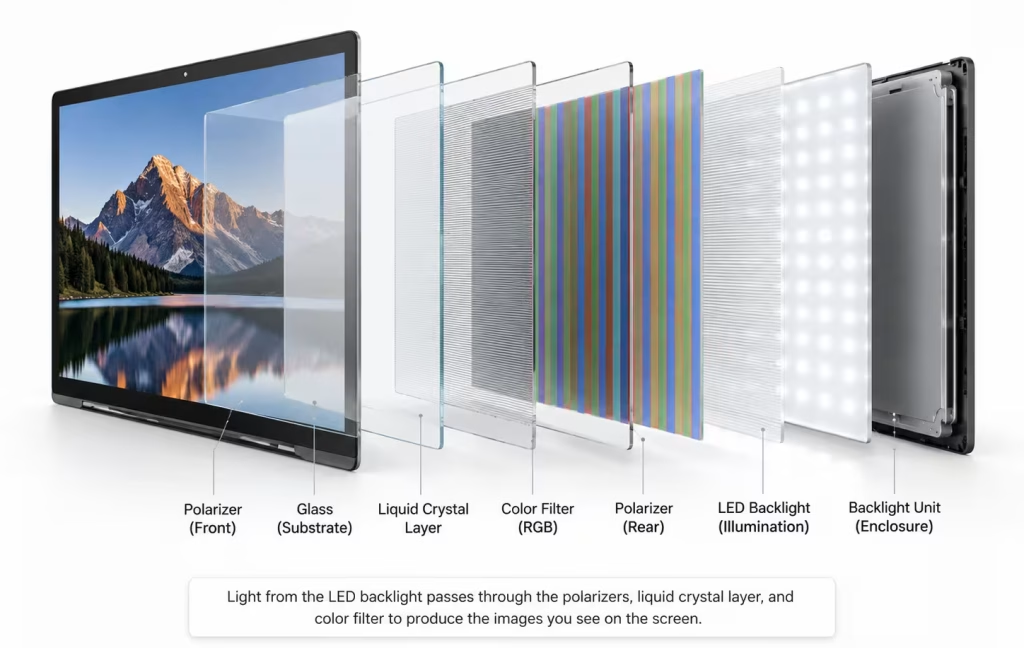
LCD stands for Liquid Crystal Display. Laptop LCD panels use a backlight—normally an LED backlight—to illuminate the screen.
Because that backlight stays active behind the pixels, LCD cannot usually produce the same true black as OLED. However, LCD quality varies greatly. A good IPS LCD can provide accurate colors, wide viewing angles, strong brightness, and sharp text.
IPS is a type of LCD, so the real comparison for many modern laptops is OLED versus IPS LCD.
LCD advantages
- Usually more affordable
- No OLED-style burn-in risk
- Many matte and anti-glare options
- Well suited to office and school use
LCD disadvantages
- Lower contrast than OLED
- Blacks can look gray in dark rooms
- Backlight bleeding may be visible
- Cheap panels can have weak colors
OLED vs LCD: Picture Quality
OLED normally wins for overall picture quality.
Because each OLED pixel controls its own light, a bright object can appear beside a completely black area without the gray glow caused by an LCD backlight. Dark scenes therefore look deeper, and perceived contrast is much stronger.
OLED screens also tend to look more vivid, but vivid does not always mean accurate. For photo or video editing, check the laptop’s color-gamut coverage and calibration rather than relying only on the OLED label.
A good IPS LCD can still look excellent for documents, browsing, video calls, and general use.
Winner: OLED
OLED vs LCD: Battery Life
For typical laptop productivity with bright webpages, documents, and spreadsheets, LCD often has the battery-life advantage over OLED. OLED power consumption varies with what is displayed, so dark content can reduce the difference while bright content can increase power use.
Battery life is more complicated than saying one technology always wins.
An LCD uses a backlight across the entire screen, so its display power use is relatively consistent at a given brightness. OLED power consumption changes with the image: black pixels can switch off, while bright pixels use more energy.
Dark interfaces can therefore help an OLED panel use less power, while white webpages, documents, and spreadsheets may use more. HDR, high brightness, resolution, and refresh rate can also affect runtime. Intel notes that HDR display use can have a significant effect on laptop battery life.
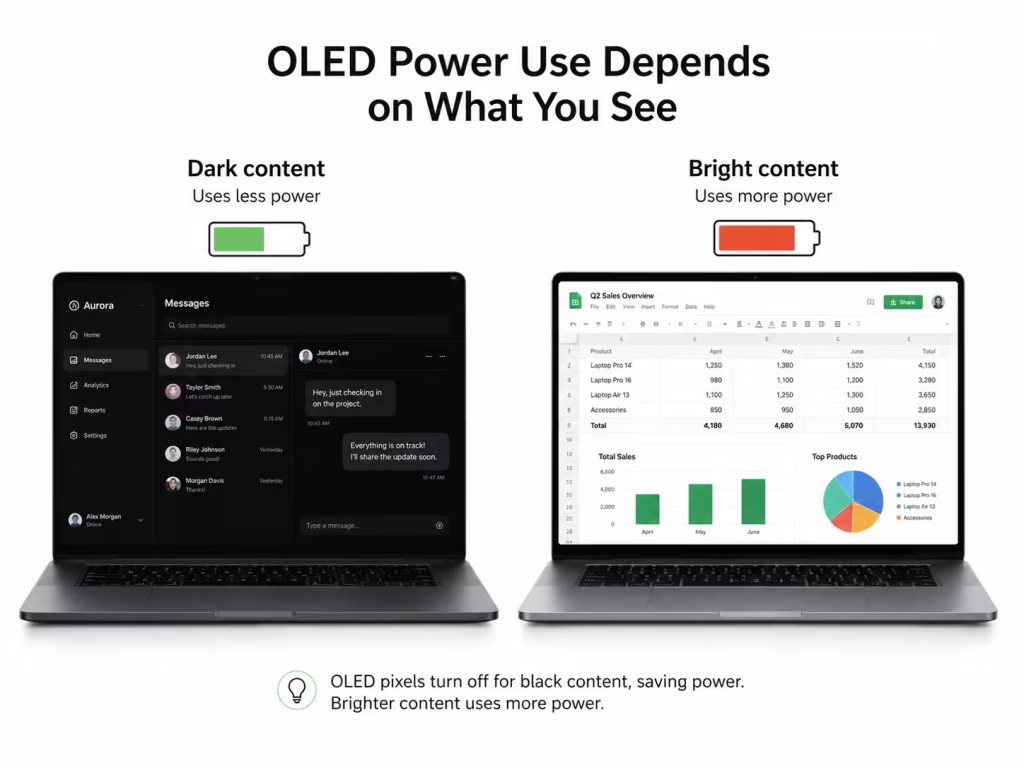
Actual battery life also depends on the processor, battery capacity, software, wireless activity, power settings, and screen brightness. Laptop manufacturers caution that runtime varies by configuration and usage.
For document-heavy work and browsing with mostly bright backgrounds, an otherwise comparable LCD model may provide longer battery life, but results vary by laptop. OLED battery life can still be excellent in a well-designed laptop, so compare testing of the exact configuration.
Typical advantage: LCD for bright, document-heavy productivity, although results vary by laptop configuration.
OLED vs LCD: Burn-In and Long-Term Use
OLED screens can sometimes show temporary image persistence, where a faint previous image remains briefly. Permanent burn-in is more serious and can occur in extreme cases when the same high-contrast image is displayed at high brightness for prolonged periods.
Possible static elements include the Windows taskbar, browser tabs, editing toolbars, and game interfaces. Modern OLED laptops reduce the risk with features such as pixel shifting, automatic dimming, and screen-refresh routines.
For normal mixed use, burn-in is unlikely to be an immediate concern. It matters more for users who leave the same static application visible for many hours every day.
LCD does not have OLED-style burn-in.
Winner: LCD
OLED vs LCD: Glare and Outdoor Use
Many OLED laptops use glossy screens. They can look vibrant indoors but may reflect windows, lights, and nearby objects.
LCD laptops are more commonly available with matte or anti-glare finishes. A bright matte IPS screen may therefore be easier to use outdoors or in a brightly lit office.
Check the exact panel’s brightness, surface finish, and anti-reflective coating. Display technology alone does not determine outdoor visibility.
Winner: Usually LCD for bright environments
OLED vs LCD for Gaming and Creative Work
OLED is excellent for gaming because of its fast response, low motion blur, deep blacks, and strong contrast. High-refresh OLED laptop panels are also available.
However, an LCD gaming laptop may cost less, leaving more of the budget for a stronger graphics card.
For photo and video editing, OLED’s contrast and wide color capabilities are useful, but color accuracy remains essential. Check sRGB or DCI-P3 coverage, calibration, brightness, and resolution for the specific laptop.
Winner: OLED for image quality; LCD may offer better value
OLED vs LCD for Work and School
LCD is often the more practical option for productivity. Documents, email, spreadsheets, and websites frequently use bright backgrounds, where OLED’s perfect blacks provide less benefit and may consume more energy.
LCD laptops also tend to cost less and offer more matte-screen choices. OLED may still be worthwhile for students or professionals who also watch movies, edit media, or want a more premium display.
Winner: LCD for most everyday productivity
Is OLED Worth Paying More For?
OLED is worth considering when you care strongly about contrast, watch many movies, play visually detailed games, edit media, and mostly use the laptop indoors.
LCD is usually better when you work mainly with documents and websites, need dependable battery life, prefer a matte screen, work in bright environments, or want the best value.
Do not choose a laptop based only on OLED or LCD. Also compare brightness, resolution, refresh rate, color coverage, and screen finish.
You can use the Laptop Picker to narrow your options or browse the full Laptop Catalog.
OLED vs LCD Laptop Screens: Final Verdict
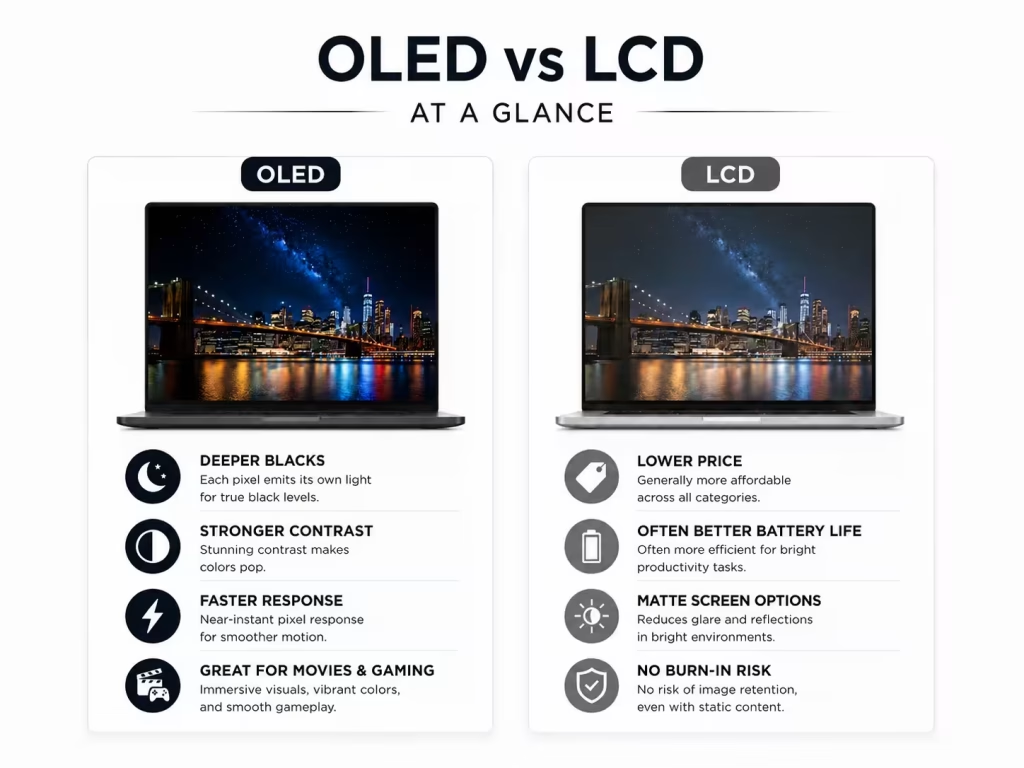
OLED provides the better visual experience. Its true blacks, high contrast, vivid image quality, and fast response make it ideal for movies, gaming, photography, and video work.
LCD remains the more practical choice for many buyers. It usually costs less, often provides better battery life for productivity, offers more matte-screen options, and has no OLED-style burn-in risk.
For students, office users, and budget-conscious buyers, a good IPS LCD is usually enough. For creators, gamers, and movie watchers who value display quality, OLED can be worth the extra cost.
Choose OLED for the best picture quality. Choose LCD for value, battery life, and everyday practicality.
Frequently Asked Questions
Is OLED better than LCD for a laptop?
OLED is better for black levels, contrast, response time, movies, and gaming. LCD is often better for price, matte-screen availability, and general productivity.
Does an OLED laptop use more battery?
It can. OLED power use depends on what is displayed. Dark content may use less energy, while bright webpages and documents may use more. Resolution, brightness, and refresh rate also matter.
Can an OLED laptop get burn-in?
Yes, but modern protection features reduce the risk. Most users who regularly change applications and content are unlikely to encounter burn-in quickly.
Is IPS the same as LCD?
IPS is a type of LCD panel. IPS screens generally provide better colors and viewing angles than cheaper TN LCD panels.
New Dell XPS Laptops – Premium Design, Long Battery Life, and High Performance
Dell returned to center stage at CES® 2026 with a big announcement: the reintroduction of the iconic XPS laptop lineup, featuring two all-new models — the Dell XPS 14 and Dell XPS 16 — alongside a preview of a forthcoming XPS 13. These refreshed laptops bring premium design, industry-leading battery life, and powerful performance to one of the most beloved premium laptop families in the market.
In addition to expanding its consumer and gaming ecosystem with Alienware and new monitors, Dell’s focus on laptops signals a renewed commitment to high-end mobile computing.
Dell XPS Is Back – With Modern Redesign and Power
After a hiatus, Dell has revived the XPS brand with a complete redesign that blends sleek industrial design and portable performance.
Dell XPS 14
The Dell XPS 14 is built for productivity and mobility. This 14-inch laptop boasts a lightweight aluminum chassis and industry-leading battery life – offering up to 27 hours of Netflix streaming or 40+ hours of local video playback on a single charge.
Key highlights:
- Thin & light design – approximately 3 pounds and just 14.6 mm thin.
- Optional OLED display and tandem high-quality screens for crisp visuals.
- Intel Core Ultra Series 3 processors with Intel Arc graphics.
The XPS 14 is ideal for professionals, students, and creators who want long battery life without compromising performance – especially for everyday tasks, streaming, and productivity workflows.
Dell XPS 16
For users who want a larger screen and more immersive experience, the Dell XPS 16 delivers:
- A 16-inch display with vibrant visuals and excellent color accuracy.
- The same signature thin-and-light profile (about 3.6 pounds).
- Premium performance with Intel Core Ultra Series 3 processors and built-in Intel Arc graphics.
- Up to 27 hours of streaming battery life – making it one of the longest-lasting laptops in its class.
The larger screen size and strong battery life make the XPS 16 a great choice for creative workflows, multimedia, and everyday computing without constant charging stops.

What’s Next: XPS 13 and Beyond
Dell teased an upcoming XPS 13 model, which it says will be the thinnest and lightest XPS ever offered at the most accessible price point yet.
Though detailed specs and pricing for the XPS 13 weren’t available at CES 2026, Dell’s announcement shows a clear strategy of broadening the XPS lineup to appeal to more users at different price levels – from premium to more affordable.
Why Dell’s XPS Return Matters
The XPS family has long been one of Dell’s flagship consumer laptop lines, known for its thin-bezel displays, premium build quality, and balance of performance and portability. Its comeback signals Dell’s renewed emphasis on flagship laptops for both prosumers and mainstream consumers.
Key reasons this matters:
- Premium design with CNC-machined aluminum
- Impressive battery life that rivals the rest of the market
- Modern performance with Intel’s latest chips
- OLED display options for vibrant visuals
- Expansion of the XPS brand with more models planned
Final Thoughts
Dell’s XPS comeback at CES 2026 highlights a renewed focus on premium laptops that combine elegant design, long battery life, and powerful performance. Whether you choose the more portable XPS 14 or the larger XPS 16, both models are positioned to compete with the best laptops of 2026 – striking a perfect balance between productivity and portability.
Lenovo Legion Pro Rollable – The Next Frontier in Gaming Laptops
Lenovo stunned tech fans at CES® 2026 with a bold concept: the Lenovo Legion Pro Rollable, an innovative gaming laptop that physically expands its display for immersive gameplay and competitive esports experiences. Built on the powerful Legion platform and featuring a horizontally expanding PureSight OLED display, the Legion Pro Rollable represents a potential glimpse into the future of portable gaming.
Unlike traditional gaming laptops with fixed screens, the Legion Pro Rollable’s display rolls outward from both sides, enabling three distinct viewing modes that transform how you play, train, and multitask.
What Is the Legion Pro Rollable?
The Lenovo Legion Pro Rollable is a proof-of-concept gaming laptop showcased at CES 2026 as part of Lenovo’s expanded Legion gaming device lineup. It pushes the boundaries of laptop screen technology by incorporating a horizontal rollable OLED panel that expands the screen on demand — perfect for gaming, content creation, and immersive media.
This concept builds on Lenovo’s earlier rollable display experiments (like the ThinkBook Plus Gen 6) by applying rollable tech specifically for gaming — a first for the Legion family.

Expandable Display With Multiple Modes
The standout feature of the Legion Pro Rollable is its rollable OLED display — a flexible screen that transitions smoothly between three modes:
- Focus Mode: A standard 16″ laptop screen for regular gaming and desktop use.
- Tactical Mode: Expands to 21.5″ for better peripheral awareness — ideal for RTS games, MOBAs, and team play.
- Arena Mode: Fully expands to about 24″ ultrawide (≈24:9 aspect ratio) for maximum immersion and esports-level visuals.
The screen uses a dual-motor, tension-based system that keeps the OLED surface taut, minimizing vibration and noise while rolling and protecting the panel from abrasion over time.
Performance: Flagship Gaming Under the Hood
While details like pricing and official release dates are not yet confirmed, reports indicate that the Legion Pro Rollable concept is based on Lenovo’s Legion Pro 7i platform, known for high-end gaming performance.
Expected performance highlights include:
- Intel® Core Ultra processors for balanced AI-boosted performance.
- NVIDIA® RTX 50-Series Laptop GPUs — including potentially the RTX 5090 — for advanced graphics fidelity.
- AI-enhanced gaming features such as adaptive lighting, frame optimization, and AI game assistance (as suggested by leaks and tech reporting).
Though Lenovo has yet to confirm final specs, this concept suggests the Rollable would sit at the high end of mobile gaming performance if it reaches retail.
Why a Rollable Gaming Laptop Matters
The Legion Pro Rollable’s expandable ultrawide display solves a key challenge for gamers on the go: screen real estate. Desktop gamers often use ultrawide monitors (21:9 or wider) to enhance peripheral vision and immersion; this concept delivers similar benefit in a single portable laptop that transforms when needed.
Benefits include:
- Enhanced peripheral awareness in competitive play
- More space for HUDs, maps, dashboards
- Better multitasking
- No need for an external monitor
Given the trend toward larger gaming displays, Lenovo’s rollable tech could influence future laptop design even if this is initially a concept.
Concept or Future Product?
It’s important to note that the Legion Pro Rollable is currently a concept device, showcased at CES 2026 to highlight what’s possible with flexible OLED technology and advanced mechanical design. Lenovo hasn’t announced pricing, availability, or confirmed that it’ll reach the consumer market yet.
However, past rollable concepts from Lenovo (like the ThinkBook Plus Gen 6) did transition to retail, indicating the potential for this device beyond CES.
Final Thoughts
Lenovo’s Legion Pro Rollable proves that laptop design is changing — blending innovation with function to offer new ways to game and interact. Though it’s currently a concept, its expandable ultrawide display could redefine portable gaming if it reaches consumers. For esports pros, on-the-go streamers, and tech enthusiasts, this rollable gaming laptop concept is one of CES 2026’s most exciting previews of what’s next.
Source: Lenovo
LG Electronics has introduced the 2026 LG gram lineup at CES® 2026, expanding its decade-long leadership in ultra-portable laptops with a major upgrade in design, performance, and smart capabilities. The newest LG gram models feature an all-new Aerominum material, combining ultra-lightweight durability with a premium metallic feel, alongside advanced dual AI functionality for enhanced productivity on the go.
What’s New in the 2026 LG gram Series
The 2026 LG gram lineup marks a significant evolution for LG’s flagship ultraportable notebook series. Here’s what sets it apart:
- Revolutionary Aerominum Build
LG’s new laptops debut Aerominum – an innovative magnesium-aluminum composite developed to reduce weight while boosting strength and scratch resistance. This material gives the chassis a sleek, premium metallic finish without adding bulk, reinforcing LG’s commitment to durability and extreme portability.
- Advanced Dual AI for Productivity
Select 2026 gram models pair on-device AI with cloud-based AI capabilities, balancing privacy and power. They support Microsoft Copilot+ PC and LG’s own gram chat On-Device AI, powered by an enhanced EXAONE 3.5 sLLM model, enabling fast, localized AI assistance without an internet connection.
This dual approach boosts everyday workflows – from multitasking and secure document handling to content creation and intelligent search – transforming the laptop into a more responsive productivity tool.
The 2026 LG gram Lineup: Models & Highlights
LG gram Pro 17 – World’s Lightest 17″ RTX Laptop
The standout model in the lineup is the LG gram Pro 17 (17Z90UR). Remarkably, LG claims this is the world’s lightest 17-inch laptop with dedicated RTX graphics, packing serious performance into a compact chassis. The 17″ WQXGA (2560 × 1600) display is great for immersive viewing, productivity, and creative work.
Equipped with an NVIDIA GeForce RTX 5050 Laptop GPU featuring 8 GB of GDDR7 memory, the Pro 17 delivers enhanced performance for tasks such as video editing, content creation, and even light gaming – all while staying surprisingly portable due to the Aerominum design.
LG gram Pro 16 – Ultra-Portable Dual AI Laptop
The LG gram Pro 16 (16Z90U) sets a new benchmark for AI-enabled ultraportable laptops. With a 16″ WQXGA+ (2880 × 1800) OLED display, this model boasts vivid visuals, deep contrast, and sharp clarity – ideal for creators, professionals, and productivity users alike.
The Pro 16 combines the latest Intel Core Ultra processors with lightweight design and advanced dual AI support, making it one of the most capable 16″ laptops in its class for everyday demanding workloads.
Enhanced Connectivity & Smart Features
To make mobile productivity even easier, LG also improved gram Link, now enabling seamless wireless file sharing, screen mirroring, and content transfer across Android, iOS, and LG webOS devices, including LG TVs and projectors. This cross-platform support creates a more integrated ecosystem for users working and collaborating across multiple screens.
On the security front, LG ThinQ integration lets you remotely lock or erase your PC if it’s lost or stolen – ensuring your data stays protected wherever you go.
Performance & Productivity
Both the Pro 17 and Pro 16 benefit from:
- Latest Intel Core Ultra series processors for fast multitasking
- Advanced dual AI (on-device + cloud) for smart features and boosted workflows
- Lightweight yet robust Aerominum chassis
- Enhanced connectivity features across software and hardware
These upgrades not only strengthen LG’s ultraportable legacy but also expand its appeal to creators, professionals, and hybrid workers who want performance without compromise.
Source: LG
Acer has just unveiled its latest Aspire AI Copilot+ laptops for 2026, powered by the newest Intel Core Ultra Series 3 processors and designed to bring AI-enhanced performance, premium design, and productivity features to mainstream users. Announced at CES 2026, the Acer Aspire 14 AI (A14-I71M/T) and Aspire 16 AI (A16-I71M/T) deliver a compelling mix of performance, versatility, and value for students, professionals, and everyday users alike.
What’s New in the 2026 Aspire AI Copilot+ Lineup
The refreshed Aspire AI laptops are part of Acer’s growing Copilot+ PC portfolio — a class of Windows 11 machines with built-in AI capabilities that go beyond traditional productivity. These new models combine modern hardware with Acer’s suite of intelligent features for enhanced performance and usability.
Key Highlights
- Powered by Intel Core Ultra Series 3 processors — up to the Intel Core Ultra 9 386H for balanced performance and efficiency.
- AI-ready Windows 11 + Acer AI tools — on-device solutions like Acer Intelligent Space streamline workflows.
- Thin & light design — premium chassis with large touchpads and a flexible 180° hinge for versatile use.
- Display options — vibrant WUXGA panels available in touch, non-touch, and OLED variations.
- Memory & storage — up to 32 GB RAM and 2 TB PCIe Gen4 SSD for responsive multitasking.

Performance & AI Integration
At the heart of these laptops are Intel Core Ultra Series 3 processors engineered for seamless everyday computing with built-in AI acceleration. These chips balance high-performance cores and efficient cores to handle diverse tasks, from productivity software to content creation and on-device AI workloads.
Acer also integrates its own AI-focused software to make everyday tasks smarter:
- Acer Intelligent Space — acts as a personalized AI hub to manage tasks and tools.
- AcerSense — system diagnostics and optimization help keep performance smooth.
- Acer PurifiedView™ & PurifiedVoice™ — improve video clarity and filter background noise during calls.
Display, Design & Build
Both the Aspire 14 AI and Aspire 16 AI are built with 16:10 aspect ratio WUXGA displays with refresh rates up to 120 Hz, providing crisp visuals and a spacious workspace. OLED display options deliver richer contrast and colors for creative and media-centric users.
Acer’s focus on practicality shows in the full-flat 180° hinge, letting the laptop lay completely flat for collaboration, presentation or shared viewing. The lightweight chassis and large touchpad add to the overall user experience, making these laptops comfortable for daily use.
Connectivity & Productivity Features
The new Aspire AI laptops come equipped with modern I/O and connectivity options:
- Thunderbolt™ 4 & USB Type-A ports for versatile connectivity.
- HDMI 2.1 for easy external display connection.
- Wi-Fi 6E & Bluetooth 5.3 for fast wireless performance.
- 1080p FHD IR webcam with triple mics — great for video conferencing.
Together with Windows 11 and Copilot+ experiences, these laptops are engineered for productivity and creativity.
Specifications
| Name | Acer Aspire 14 AI | Acer Aspire 16 AI |
| Model | A14-I71M/T | A16-I71M/T |
| Operating System | Windows 11 Home | Windows 11 Home |
| Processor | Up to Intel Core Ultra 9 processor 386H | Up to Intel Core Ultra 9 processor 386H |
| Graphics | Intel Graphics | Intel Graphics |
| Display | 14-inch WUXGA (1920×1200), 16:10 aspect ratio, up to120 Hz refresh rate, 45% NTSC color gamut support, narrow bezel design, with touch/non-touch and OLED panel option | 16-inch WUXGA (1920×1200), 16:10 aspect ratio, up to120 Hz refresh rate, 45% NTSC color gamut support, narrow bezel design, with touch/non-touch and OLED panel option |
| Memory | Up to 32 GB LPDDR5X onboard system memory | Up to 32 GB LPDDR5X onboard system memory |
| Storage | Up to 1 TB M.2 PCIe Gen 4 SSD | Up to 2 TB M.2 PCIe Gen 4 SSD |
| Camera | 1080p FHD IR, with privacy shutter | 1080p FHD IR, with privacy shutter |
| Audio | DTS® Audio, dual speakers with triple-mic array | DTS® Audio, dual speakers with triple-mic array |
| Ports | Two USB Type-C (supporting Thunderbolt™ 4), two USB Type-A, HDMI 2.1, Audio jack | Two USB Type-C (supporting Thunderbolt™ 4), two USB Type-A, HDMI 2.1, Audio jack |
| Battery | 65 Wh battery | 65 Wh battery |
| Networking | Wi-Fi 6E, Bluetooth 5.3 or above | Wi-Fi 6E, Bluetooth 5.3 or above |
| Dimensions/Weight | 312.4 (W) x 225.9 (D) x 11.6/15.8 (H) mm (12.3 x 8.89 x 0.46/0.62 inches). 1.25 kg (2.76 lbs.) | 354.9 (W) x 250.1 (D) x 11.5/15.8 (H) mm (13.97 x 9.85 x 0.45/0.62 inches), 1.52 kg (3.35 lbs.) |
| Features | Copilot+ PC, Acer Intelligence Space, AcerSense, Acer PurifiedView™, Acer PurifiedVoice™, Acer My Key | Copilot+ PC, Acer Intelligence Space, AcerSense, Acer PurifiedView™, Acer PurifiedVoice™, Acer My Key |
Availability
Acer has announced a staged rollout for these Copilot+ PCs:
- Aspire 14 AI — available in EMEA & Australia mid-2026, North America in Q3 2026.
- Aspire 16 AI — rolling out globally through Q2 2026.
Pricing and exact regional configurations will vary, so check with Acer or local retailers for the latest details.
Source: Acer
ASUS has announced the latest evolution of its groundbreaking dual-screen laptop design with the Zenbook DUO (2026) UX8407, bringing significant enhancements in performance, portability, durability, and user experience. Officially unveiled on January 7, 2026, this model continues ASUS’s tradition of pushing the boundaries of productivity and creativity with a laptop built for professionals, creators, and multitaskers.
A next-generation dual-screen laptop designed for productivity, multitasking, and creative workflows. Featuring dual 14-inch 3K OLED displays, powerful Intel Core Ultra processors, and a refined hinge and keyboard system, the Zenbook DUO aims to redefine what a modern productivity laptop can be in 2026.

Next-Level Power and Performance
The Zenbook DUO (2026) delivers a dramatic boost in performance thanks to support for the Intel® Core™ Ultra X9 Series 3 processor, combined with a 99Wh dual-battery system, this laptop is engineered for extended runtime — helping you stay productive even during the longest work sessions.
Enhanced thermal management, including precision-cut venting and larger fans, allows the system to maintain peak performance while staying cool and quiet. With up to 180 TOPS of AI performance, the Zenbook DUO is ideal for AI-accelerated workflows, complex multitasking, and creative applications.
Immersive Dual-Screen Experience
At the heart of the Zenbook DUO is its signature dual 14-inch ASUS Lumina Pro OLED displays. These 3K screens deliver impressive clarity, up to 1,000 nits peak brightness, and variable refresh rates from 48–144Hz for smooth visuals. ASUS has redesigned the layout to reduce the gap between screens by 70%, creating a more unified workspace.
Innovative Design and Durability
The laptop strikes a remarkable balance between strength and portability with its Ceraluminum™ chassis. This lightweight yet rugged build is complemented by a new hideaway hinge and MagLatch™ keyboard docking system, which make it easier than ever to transition between work modes — from laptop to presentation or sharing mode.
Specifications
| CPU | Intel® Core™ Ultra X9 processor 388H Intel® Core™ Ultra 9 processor 386H Intel® Core™ Ultra 7 processor 355H |
| Display | Dual displays: 14.0″, 3K (2880 x 1800) OLED 16:10 aspect ratio, 0.2ms response time, 144Hz refresh rate, 500 nits, 1000 nits HDR peak brightness, 100% DCI-P3 color gamut, 1,000,000:1, VESA DisplayHDR™ True Black 1000, 1.07 billion colors, Pantone® Validated, glossy display, 70% less harmful blue light, Touch screen, screen-to-body ratio 93%, with stylus support |
| Operating system | Windows 11 Home / Pro |
| Graphics | Intel® Arc™ Graphics |
| NPU | Intel® NPU up to 50TOPS |
| Main memory | Up to 32GB LPDDR5x 9600 MT/s RAM |
| Storage | Up to 2TB PCIe® Gen 4 SSD |
| Connectivity | WiFi 7 (802.11be) Bluetooth® 5.4 |
| Camera | FHD (1080p) IR camera with Windows Hello ASUS AI Camera |
| I/O ports | 2 x Thunderbolt™ 4 Type-C® 1 x USB 3.2 Gen 2 Type-A 1 x HDMI® 2.1 (FRL) 1 x Audio jack |
| Touchpad | 127 x 79mm ASUS ErgoSense touchpad |
| Audio | Smart Amp Technology Built-in speaker Built-in array microphone with Cortana support Dolby Atmos® certified |
| Battery | 99Wh |
| AC adapter | 100W adapter Output 20V DC, 5A, 100W Input: 100~240V AC, 50 / 60Hz universal |
| Dimensions | 31.01 x20.86 x 1.45cm (without Bluetooth® keyboard) 31.01 x 20.86 x 1.96cm (with Bluetooth® keyboard) |
| Weight | 1.35 kg (without Bluetooth® keyboard) 1.65 kg (with Bluetooth® keyboard) |
* Specifications, content and product availability are all subject to change without notice and may differ from country to country. Actual performance may vary depending on applications, usage, environment and other factors. Full specifications are available at http://www.asus.com
Pros & Cons
| Pros | Cons |
| Dual 14″ 3K OLED Displays The standout feature of the Zenbook DUO (2026) is its dual OLED setup, delivering sharp visuals, deep blacks, and excellent color accuracy—perfect for multitasking, content creation, and productivity workflows. Powerful Intel Core Ultra AI Performance Equipped with the latest Intel Core Ultra processors, this laptop offers strong CPU, GPU, and AI acceleration, making it suitable for advanced multitasking and AI-assisted applications. Excellent Multitasking & Productivity Running multiple apps across two screens significantly boosts workflow efficiency, especially for developers, designers, analysts, and business users. Premium, Lightweight Build The Ceraluminum™ chassis keeps the laptop lightweight while maintaining durability, making it portable despite its dual-screen design. Long Battery Life for a Dual-Screen Laptop The large 99Wh battery provides impressive runtime compared to other dual-display laptops, even with both OLED screens active. High-Quality Audio & Connectivity The six-speaker Dolby Atmos system, Thunderbolt 4 ports, Wi-Fi 7, and modern I/O make this a well-rounded premium device.1 | Premium Price Expected Dual OLED displays and high-end hardware place the Zenbook DUO (2026) in a higher price bracket, which may not suit budget-focused buyers. Learning Curve for Dual-Screen Workflow Users coming from traditional laptops may need time to adapt to managing apps across two displays. Not Ideal for Gaming While Intel Arc graphics are capable, this laptop is designed for productivity and creative work—not serious gaming. Keyboard Detachment May Not Suit Everyone The detachable keyboard design offers flexibility but may feel unfamiliar to users who prefer a fixed, traditional laptop layout. |
ASUS Zenbook DUO (2026) FAQ
Does the ASUS Zenbook DUO (2026) support stylus input?
Yes, both OLED displays support touch and stylus input, making it ideal for creators and note-taking.
Is the Zenbook DUO good for multitasking?
Absolutely. The dual-screen setup combined with Intel Core Ultra AI performance allows advanced multitasking workflows.
Can the Zenbook DUO replace a desktop setup?
For many productivity and creative users, yes — especially when paired with external peripherals.
Source: ASUS